


Indiana Farm Bureau
3.134.00 Reviews
App Specs
- Version
- 3.10
- Updated On
- License
- Free
- Downloads
- 10,000+
- Developer
- IN Farm Bureau
- Categories
- Events
- Platform
- Android
Screenshots
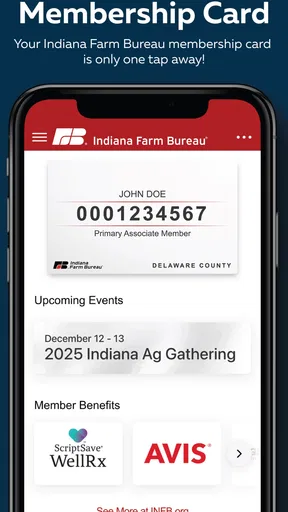
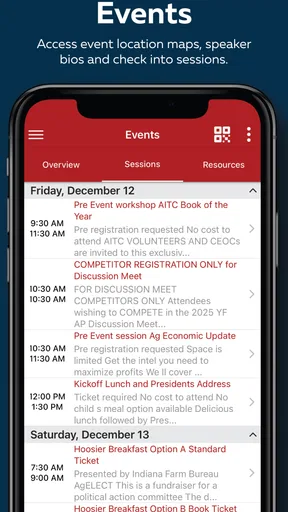
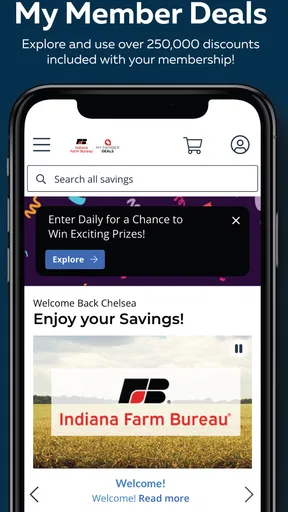
 Analysis by AppCompare
When I try an organization’s app for the first time, I want to know quickly whether it helps with a real task or simply gives me another place to look for updates. The Indiana Farm Bureau app is aimed at people connected to Indiana agriculture, from members who want an organization-specific point of contact to residents who want to keep up with rural events. I would approach it as a companion to the Indiana Farm Bureau’s activities, not as a general-purpose farming tool or a replacement for every service a member might use.
Where people can get stuck
The first practical question is whether the app matches what you need today. An event-focused app can be useful when you already know you want information tied to Indiana Farm Bureau, but less helpful if you are looking for broad agricultural news, local weather, or a general directory of events. I would start by deciding on one concrete task—checking an event, looking for member information, or finding an organization update—then see whether the app makes that task straightforward.
That small test matters because an official app can sound broader than its everyday role. If you open it expecting a complete farm-management system, a marketplace, or a national agriculture news feed, you may be disappointed. Its value is more likely to come from having Indiana Farm Bureau information gathered in one place. For a person who already follows the organization, that focus can save a little searching; for someone with no connection to it, the reason to keep the app may be less obvious.
I would also avoid assuming that every item shown in an app is current simply because it appears there. For time-sensitive plans, check the details displayed for the specific event or update and use the relevant official communication channel if something is unclear. That is a sensible habit with any organization’s event app, especially when travel, registration, or a schedule depends on the information.
Setup checks before relying on it
The app is free, and it is listed for people of all ages. It was released on November 15, 2017, and the current version is 3.9; Android users need version 7.0 or later. Those details make it worth checking compatibility before troubleshooting: if an older device cannot install or update it, the operating system may be the obstacle rather than a fault in the app.
After installing, I would check the basics before building it into a routine: confirm that the app opens, look for the section related to the task you care about, and make sure the information you need is visible. If a sign-in or membership step appears, use the account details associated with your Indiana Farm Bureau membership rather than guessing at credentials. A failed login is often easier to resolve by carefully checking the email or password than by repeatedly reinstalling the app.
It is also useful to distinguish between an app problem and a connection problem. If a page does not load, try again when the device has a reliable internet connection, then reopen the app. If only one item seems unavailable while other screens work, that points toward a specific content or account issue rather than a total failure. Keeping track of what you tapped and what happened makes it easier to describe the problem if you need help.
Worth Reading Before You Choose

EA SPORTS FC Mobile 26 Is a Bigger Football Game, but It Takes Time

Flipboard Shows What News Apps Must Do Beyond the Feed

Switching to Android Auto Means Rethinking Your Driving Routine

Google Calendar Makes a Crowded Week Easier to Manage

Ludo King Makes the Most of the Minutes Between Plans

Baby Panda World Brings Quick Play to Modern Phones, but Its Game Library Feels Busy
Recovering a routine when something goes wrong
If the app freezes or behaves unexpectedly, I would take the least disruptive steps first: close it, reopen it, and retry the same action. If the issue persists, restart the device and check whether the app has an available update. These ordinary checks can clear a temporary hiccup without changing account information or removing anything you still need.
Before uninstalling, consider whether you rely on a saved login or have a particular item open that you may want to revisit. Reinstallation can be a reasonable last resort for a persistent technical issue, but it is not the first thing I would try when a single page fails to load. If the problem concerns membership access, event details, or an account, contacting Indiana Farm Bureau through its established support route may be more effective than repeatedly changing device settings.
For a practical event-day workflow, I would check the relevant information before leaving home, note the location and timing in a calendar or another familiar tool, and then use the app again if I need to confirm details. That way, a slow connection on the road does not become the only thing standing between me and the plan. The app can be the place where I find organization-specific information, while my phone’s calendar remains the dependable reminder.
When the app may not be the cause
Not every missing update or failed screen means the app itself is broken. A weak connection, an outdated operating system, an account detail entered incorrectly, or a change in the information being viewed can all affect what appears. I would test a different screen and retry on a stable connection before deciding that the whole app is unusable.
There is also a difference between an official organization app and general alternatives. A web search or a broad events calendar may cover more organizations and locations, while the Indiana Farm Bureau app is more specific to its namesake organization. If you need a wide survey of agricultural events, a broader source may be the better starting point. If you want the convenience of checking material associated with Indiana Farm Bureau, a dedicated app can be more direct.
That distinction helps set expectations. I would not make it my only source for urgent travel decisions, a complete farm operation, or information that depends on a separate service. Instead, I would use it for the Indiana Farm Bureau-related task in front of me and keep other tools available for directions, reminders, or wider research. This is a modest division of labor, but it prevents an organization app from being judged by jobs it was not designed to do.
All About Community
First off, let's talk community. The Indiana Farm Bureau app is all about bringing people together. Whether you’re a farmer, a rural resident, or someone with a keen interest in agriculture, this app offers a platform where you can connect with like-minded folks. With forums and discussion boards, you can share insights, ask questions, and maybe even find solutions to those pesky farming challenges. It’s like having a friendly neighbor you can chat with anytime, without having to leave your couch.
Features That Shine
So, what exactly can you do with this app? Let’s break it down:
- News & Updates: Stay updated with the latest news in agriculture. From weather alerts to policy changes, you’ll never miss a beat.
- Event Calendars: Want to know when the next big agricultural fair is happening? The app has a comprehensive calendar of events. It’s your ticket to networking and learning opportunities.
- Membership Management: If you’re a member of the Indiana Farm Bureau, managing your membership has never been easier. Renewals, benefits, and more are just a tap away.
- Resource Library: Whether you’re looking for farming tips or educational materials, the app’s resource library is a treasure trove of information.
Those tools are most useful when I have a reason to return, rather than when I install the app just to browse. A member preparing for a meeting, for example, could check the organization’s information beforehand and keep event details handy. Someone curious about local agriculture could use it to explore relevant updates and opportunities, then decide whether following Indiana Farm Bureau more closely is worthwhile.
One practical trade-off is that a focused app can feel quieter than a general social network. That is not automatically a weakness: less unrelated material can make it easier to concentrate on organization-specific information. But if what you want is a broad conversation with farmers across many regions, you may be better served by a larger community forum or a specialist publication. I would treat this app as a focused doorway, not as the whole online agricultural world.
Navigation and Usability
Okay, let’s talk usability. In my experience, navigating the Indiana Farm Bureau app feels as natural as your morning coffee. The interface is clean and intuitive, making it easy even for those who aren’t tech-savvy. You’ll find everything at your fingertips without any unnecessary clutter. Plus, the app runs smoothly with minimal glitches, which is always a win in my book.
For a busy day, I would use it in short visits instead of expecting it to manage every part of a schedule. Imagine planning to attend an Indiana Farm Bureau event: I would open the app while planning, confirm the information I need, save the appointment in my regular calendar, and return to the app if I want to check for changes. The useful insight is that a dedicated organizational source and a personal calendar solve different problems; using both reduces the chance that an event detail gets buried in a stream of other notifications or messages.
If the app seems confusing at first, I would resist tapping through every section at random. Start with the one item that prompted the download and learn where that information lives. That creates a simple personal map of the app and makes a later visit faster. It also helps reveal whether the app is a good fit: if the sections you actually need are easy to reach, its narrow focus is a benefit; if you keep looking for unrelated services, it is probably not the right tool for those jobs.
Why It Stands Out
Now, you might be wondering what sets this app apart from others in the agricultural sphere. For one, it’s deeply rooted in community involvement. Unlike other apps that focus solely on data and analytics, the Indiana Farm Bureau app emphasizes human connection. It’s about sharing, learning, and growing together. Plus, being tailored specifically for Indiana’s agricultural community, it offers localized content and insights that are both relevant and practical.
The organization behind it is IN Farm Bureau, and that local identity is the clearest reason to choose this over an all-purpose events app. A broad calendar may offer more categories, but it cannot be assumed to give the same organization-specific view. Conversely, if you are not interested in Indiana Farm Bureau events or resources, the app’s local emphasis will not by itself make it useful. I would recommend it most readily to members and people who have a recurring reason to follow the organization, rather than to anyone who simply wants generic farming content.
The app has an average rating of 3.0 from 73 ratings, with 32 written reviews, and it has been installed over 10,000 times. I take that as a reason to keep expectations measured, not as a verdict that every person will have the same experience. Ratings combine different devices, needs, and expectations; the more useful question for me is whether the app covers the specific Indiana Farm Bureau task I need. Its free price also makes a quick trial relatively low-commitment, though free does not mean it will replace broader tools or suit every user.
Who should keep it—and who should pass
I would keep the app if I were an Indiana Farm Bureau member who checks organization information more than once in a while, or a local resident who wants a convenient route to its activities. It may also suit someone helping a family member plan around an organization event: the person doing the planning can check the relevant information, then share the practical details through whatever calendar or messaging method the family already uses.
I would skip it if I wanted crop planning, farm accounting, equipment tracking, nationwide policy coverage, or a general event-discovery service. Those needs call for tools built for those jobs. I would also hesitate if I only needed to attend one event and could get the details directly through another dependable channel; installing a dedicated app for a single brief task may not be worthwhile. That is not a criticism so much as a reminder to match the app to how often you expect to use it.
If you are deciding whether to install it, ask yourself two things: do I need Indiana Farm Bureau information, and am I likely to return to it? If both answers are yes, the app has a clear role. If either answer is no, a browser, a general calendar, or another established source may be simpler. In my view, that quick test is more useful than judging it against a long list of features that you may never use.
Final Thoughts
So, is the Indiana Farm Bureau app worth downloading? In my humble opinion, absolutely. Whether you're directly involved in agriculture or just have an interest in rural life, this app provides value on multiple levels. It’s not just about farming—it’s about fostering a community, staying informed, and embracing the spirit of Indiana’s agricultural heritage. So why not give it a try? Dive in, explore, and maybe even plant a seed or two—digitally speaking, of course.
My recommendation comes with a clear boundary: try it for the Indiana Farm Bureau information you genuinely need, and judge it by whether it makes that task easier. I would not rely on it as my only source for every agricultural question or as a substitute for a personal schedule, but I can see its appeal for people who want a dedicated connection to the organization. With an average rating of 3.0 and a specific regional focus, it is best approached with practical expectations. For the right user, that focused role is exactly the point.
Pros
- User-friendly interface for easy navigation.
- Comprehensive insurance policy options.
- Quick access to agent contact details.
- Secure online payment system.
- Useful claim tracking feature.
Cons
- Limited customization of notification settings.
- App occasionally crashes on older devices.
- Some features require strong internet connection.
- Geographical restrictions on certain services.
- Limited support for non-English speakers.
FAQs for Indiana Farm Bureau
What features does the Indiana Farm Bureau app offer?
The Indiana Farm Bureau app provides a range of features beneficial to members, including policy updates, event calendars, and exclusive member benefits. Users can also access their insurance policies, pay bills, and receive important notifications directly through the app. It’s designed to streamline communication and provide easy access to essential services.
Is the Indiana Farm Bureau app available for both Android and iOS devices?
Yes, the Indiana Farm Bureau app is available for download on both Android and iOS platforms. Users can find it on the Google Play Store for Android devices and the Apple App Store for iOS devices. Ensure your device meets the app’s minimum system requirements for optimal performance.
How user-friendly is the Indiana Farm Bureau app for new users?
The app features an intuitive interface designed to be accessible for all users, regardless of their tech-savviness. With a clear layout and straightforward navigation, new users can easily find what they’re looking for. The app also provides helpful guides and customer support options to assist with any questions or issues.
Are there any costs associated with using the Indiana Farm Bureau app?
Downloading and using the Indiana Farm Bureau app is free of charge for members. However, certain features or benefits within the app may require an active membership or involve separate costs, such as insurance payments. Always check the specific terms and conditions related to your membership.
How secure is the Indiana Farm Bureau app for managing personal information?
Security is a top priority for the Indiana Farm Bureau app. It uses advanced encryption methods to protect users’ personal and financial information. Regular updates and security patches are applied to ensure ongoing protection. Users are encouraged to keep their app updated and use strong passwords to enhance security.


